
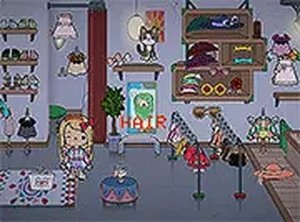
Description
Getting Started with Style Studio
Upon entering the game, young players see a friendly character model waiting to be dressed. A simple tap or click selects the character, and the wardrobe screen opens immediately. Large, brightly colored icons represent different clothing categories such as shirts, pants, shoes, hats, and glasses. Children can explore each category by tapping on it, revealing a scrollable set of items. The interface uses clear visual cues instead of text, making it accessible even for toddlers who are still learning to read. The game loads quickly in any modern web browser and requires no account creation or download, so play can begin within seconds.
Building an Outfit Step by Step
Once inside the dressing area, children select an item from a category to see it appear on the character. If they want to try something else, they simply pick another piece from the same group, and the old item is replaced. Many clothing pieces come with a color palette option, allowing kids to change the shade of a shirt or hat by tapping on a color swatch. This feature encourages experimentation with color combinations and pattern mixing. To remove an item entirely, the child can tap on it again or choose a different piece. There are no wrong choices, and every combination is allowed, promoting a stress-free environment for creative decision-making.
Encouraging Fine Motor and Cognitive Skills
The drag-and-select mechanics require precise finger movements, which helps develop fine motor coordination in young children. As kids decide which colors and patterns look good together, they practice early cognitive skills like matching, sorting, and planning. The game also supports color recognition by presenting a variety of hues and shades within the wardrobe. Because there is no time limit or scoring system, children can take as long as they like to perfect their designs. This relaxed pace allows them to focus on the process of creation rather than on achieving a specific outcome.
Safe and Distraction-Free Environment
Parents will appreciate that Style Studio contains no advertisements, pop-ups, or external links. The game runs in full-screen mode to keep young players focused on the activity. There are no in-app purchases or registration requirements, so children cannot accidentally spend money or share personal information. The entire experience is designed to be a secure digital space where kids can express themselves freely without commercial interruptions. This makes it a reliable choice for quiet playtime at home or on the go, especially on tablet devices where touch controls feel natural.
Saving and Sharing Creations
When an outfit is complete, the game offers a simple way to save the final image. Parents can help their child capture a screenshot of the character, which can then be printed or shared with family members. This feature gives children a sense of accomplishment and pride in their work. It also provides an opportunity for parents to talk with their kids about their design choices, reinforcing positive feedback and encouraging further creative exploration. The ability to save and revisit past outfits adds a layer of continuity to the play experience.






Player Comments
Sign in to comment
You must be logged in before posting a review or rating.
No account? Create one
No comments yet. Be the first to comment!